Product
Read from here: your study material, out loud
Click a paragraph. Press play. Keep learning. A tiny Chrome reader with page highlighting, speed buttons, free browser voices, and optional AI voices.
Sometimes studying means wanting to understand the material without spending another hour staring at it. Read from here turns the page already open in Chrome into something you can listen to. Click a paragraph or photo, then press play. A small, rounded, translucent player keeps play/pause, speed, and settings within reach.
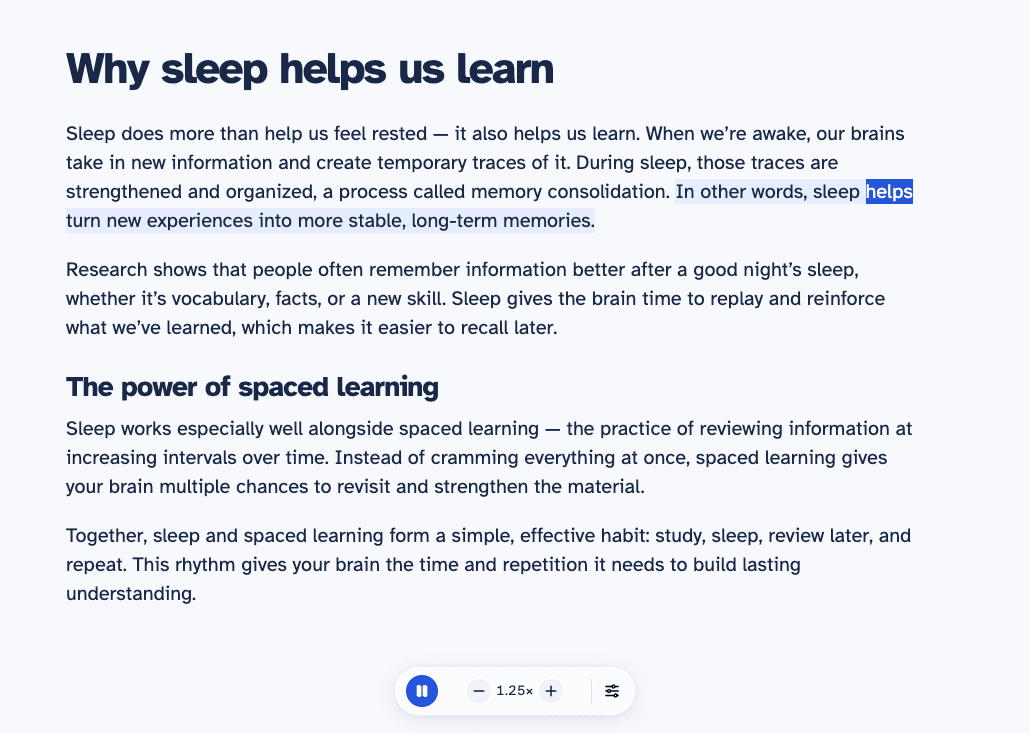
Pick a place and keep your own pace
With the player open, readable text shows a hand cursor and a blue outline as you move over it. Click a paragraph to move your place, including in lessons that expand as you study. Playback continues if already playing and stays paused if paused. Clicking a photo begins at the next caption or passage; it does not extract words inside the picture. Links, forms, buttons, and dragging to select or copy text keep their usual behavior.
The player has four buttons: play/pause, slower, faster, and settings. Speed changes in steps of 0.25×, from 0.5× to 3×. The spoken text is highlighted directly on the page. Browser voices that supply word events highlight the current sentence and word; cloud voices highlight the current passage. Automatic scrolling can be turned off in settings when you want to scroll independently.
Start with browser voices, then choose an AI voice
Browser voices work without an API key or a speech API charge from the extension. The available voices and their quality depend on the device and its installed speech engines. Some voices need a network connection, so browser speech is not a blanket promise of offline listening.
Voice settings slide open in Chrome’s sidebar. Choose browser voices or bring your own OpenAI, ElevenLabs, or Gemini key, select a model and voice, and hear a short preview. You can close the sidebar while listening continues. Cloud playback and previews use your provider account and may cost money. Generated audio changes speed locally without another generation request; browser speech restarts the current passage when its speed changes.
A small extension with direct provider requests
The implementation uses plain JavaScript, HTML, and CSS with Chrome Manifest V3. Activating the extension injects the page reader and floating player. A private offscreen extension context handles audio independently of the settings sidebar. Page extraction prefers article or main content, filters common navigation and hidden elements, and preserves anchors for highlighting.
There is no extension-operated backend. Cloud passages go directly to the chosen provider. Keys stay in trusted browser session storage by default, with an option to remember them locally on the device. Saved keys are not encrypted or browser-synced, and removing a key clears both storage locations. Local storage does not mean the played text stays on the device when a cloud voice is selected.
Audio is generated one passage at a time, with up to twelve generated passages cached in memory. Pause can let an already-started request finish, but it does not generate the next passage. Cancellation checks prevent a late response from starting playback after you have moved to another passage.
What the current version verifies
The repository includes twelve core checks for text splitting, Unicode, provider requests, voice pagination, cancellation, playback state, and reuse of generated audio. Chromium integration checks exercise the shipped toolbar permission flow, paragraph and photo picking, pointer feedback on expanded content, text selection and links, sidebar settings, voice previews, key storage, playback, highlighting, and the narrow floating player.
Provider responses in those tests are simulated. They verify the application flow without making paid requests, but do not establish live model availability, account access, latency, or which voice sounds most natural. Those still need checking with the listener’s own account and study material.
Install locally and know the boundaries
The public repository has a downloadable extension ZIP in its releases. Unzip it, open chrome://extensions, enable Developer mode, and choose Load unpacked for the folder containing manifest.json. When installing from source, select the extension folder. No build step or extension account is required. Click its pinned icon on an article to begin.
The extension works with readable HTML in Chrome 116 or later and does not have a Chrome Web Store listing yet. Chrome internal pages, the Chrome Web Store, built-in PDF viewers, scanned documents, words inside images, canvas documents, and cross-origin frames are outside its scope. Unusual layouts can affect text extraction, and cloud generation may leave a short gap between passages. Click the extension icon again to close the player and stop listening. Navigating away or closing the source tab also stops playback.
Sources and further reading
Based on the linked project documentation, reviewed on 2 November 2026. Capabilities and limitations describe that documented version.
- Features, voices, and limitations
- Installation guide
- Architecture and verification
- Provider comparison and primary sources